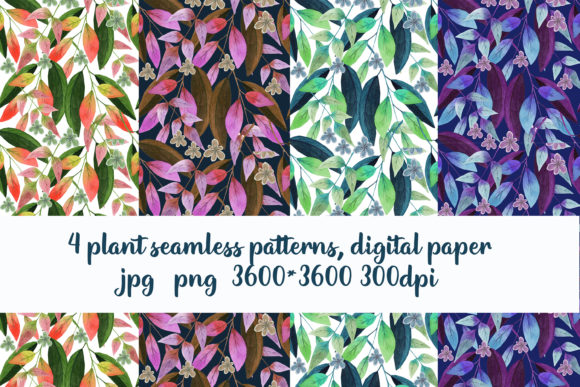
4 Plant Seamless Patterns, Digital Paper
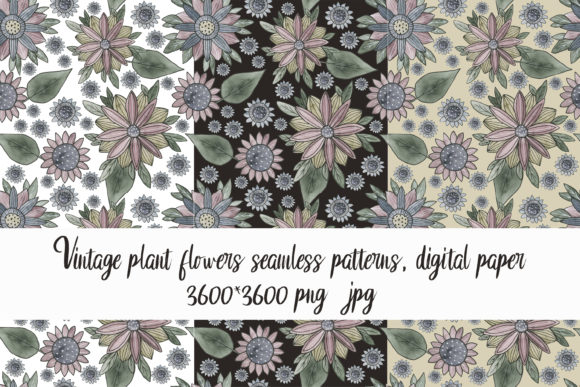
Seamless patterns are foundational assets—not decorative afterthoughts. When you’re building brand collateral, designing print-on-demand products, crafting digital course materials, or preparing presentation decks, the background texture you choose affects cohesion, professionalism, and visual hierarchy. The 4 Plant Seamless Patterns, Digital Paper delivers four high-fidelity, botanically inspired tileable designs—each created with intention for real-world application across creative and business workflows.
What It Is—and Where It Fits in Your Process
This is a digital download: four 3600 × 3600 pixel files in both JPG and PNG formats, delivered at 300 dpi. That resolution ensures sharp output whether you’re printing large-format posters, packaging prototypes, or letterpress stationery—or scaling down for web banners, social media templates, or email headers. Because they’re seamless, each pattern repeats without visible seams or breaks, eliminating manual tiling work in design software like Adobe Photoshop, Illustrator, Affinity Designer, or Figma.
These aren’t isolated visuals. They function as part of a broader asset pipeline—complementing color palettes, typography systems, icon sets, and layout grids. You might source them early in a project to establish mood and tone, use them mid-process to unify disparate elements (like infographics and slide backgrounds), or deploy them late-stage for polish and consistency across deliverables.
How It Integrates With Tools and Teams
The 4 Plant Seamless Patterns, Digital Paper works where your workflow already lives. In Adobe Creative Cloud, drag a PNG into a new layer, set blending mode to Multiply or Overlay for subtle texture, or use it as a fill in shape layers. In Canva, upload the file and apply it as a background on any template—no plugin required. For educators using Google Slides or Microsoft PowerPoint, insert the image, right-click → “Format Background” → “Picture or texture fill” → “Insert picture from file.”
If you collaborate with designers, marketers, or developers, sharing these files as branded assets helps maintain visual continuity—even when people work independently. Store them in your team’s shared cloud drive (e.g., Dropbox or Google Drive) under a clear naming convention like patterns_plant_olive-leaf_3600x3600_png. That supports version control and avoids accidental substitution with lower-res or non-seamless alternatives.
Practical Use Cases Across Roles
Freelancers & Small Business Owners: Use one pattern as a consistent background across client proposal PDFs, invoice headers, and pitch decks. A cohesive texture reinforces professionalism without competing with content—especially useful when you don’t have time to commission custom design for every deliverable.
Educators & Course Creators: Apply a soft leaf pattern behind key learning objectives or module summaries in digital handouts. It adds visual rhythm without overwhelming text-heavy slides or worksheets. Because all four patterns share botanical roots but vary in density and scale, you can assign each to a different course section—creating intuitive visual navigation.
Bloggers & Content Marketers: Convert one pattern into a subtle watermark for original photography or infographics. Or use it as a textured overlay on hero images in blog posts—lower opacity to 15–20% so readability stays intact while adding depth and organic warmth.
Hobbyists & Print-on-Demand Sellers: Import directly into Printful, Gelato, or Redbubble uploader tools. Test how each pattern renders on mugs, notebooks, or tote bags before ordering samples. The 3600 × 3600 size gives ample bleed room and maintains clarity even when stretched across curved surfaces.
Preparation and Compatibility Considerations
No special software is required—but preparation matters. Before importing, verify your document’s color profile matches the file’s (RGB for digital use, CMYK if prepping for professional print). All four patterns are provided in sRGB, making them safe for screen-based work and compatible with most online printers that auto-convert.
File organization impacts long-term efficiency. Create a dedicated folder named Digital Assets / Textures / Plant Patterns and save both JPG and PNG versions. Keep the PNG for layered editing (it supports transparency) and JPG for lightweight embedding in presentations or emails. Name each file clearly: plant-pattern-mint-leaf_3600x3600_png, plant-pattern-fern-frond_3600x3600_jpg, etc. This avoids confusion during tight deadlines.
Quality Control and Consistent Application
Because these are digital papers—not mockups or layouts—they require intentional placement. A common oversight is overusing texture: applying it to every background in a multi-page document dilutes impact. Instead, reserve one pattern for cover pages and section dividers; use white space or solid colors elsewhere. That creates breathing room and directs attention where it matters most.
Test contrast. If placing light-colored text over a pattern, add a semi-transparent dark overlay (10–15% black at 50% opacity) beneath the text box. This preserves legibility without flattening the texture. In CSS-driven projects, use background-image with background-repeat: repeat—no need for complex SVG tiling scripts.
Long-Term Usability and Workflow Efficiency
Unlike trend-dependent graphics, botanical patterns age well. Their organic structure avoids dated stylistic cues (e.g., heavy gradients or glass-morphism), meaning the 4 Plant Seamless Patterns, Digital Paper remains usable across multiple projects over months or years. Reuse them across seasons—swap in different patterns to signal thematic shifts (e.g., fern for spring launches, olive branch for summer campaigns) without redesigning entire templates.
They also reduce decision fatigue. When you’ve already selected and tested four reliable, high-quality options, you skip the “which background should I use?” pause mid-workflow. That saves 2–5 minutes per task—adding up to hours saved annually for frequent designers or content producers.
What’s Not Included—and Why That Matters
The layouts shown in previews are for demonstration only. They’re not part of the download. This isn’t an omission—it’s a design choice aligned with professional practice. Real workflows demand flexibility: you decide how much texture to apply, where to crop, how to blend, and whether to adjust saturation or brightness. Providing raw, unaltered files respects your judgment and technical autonomy.
If you need guidance adapting a pattern to a specific tool or output format, reach out directly. Questions about color matching, scaling for fabric printing, or optimizing for retina displays are all valid—and best answered with context about your actual setup, not generic assumptions.
Getting Started Tomorrow—Not Next Quarter
You don’t need to overhaul your system to use the 4 Plant Seamless Patterns, Digital Paper. Pick one pattern. Open your next presentation, newsletter draft, or product mockup. Replace the default white background with it—just once. Adjust opacity to 8–12%. Notice how it changes the feel: warmer, grounded, intentional. Then ask: where else could this same texture reinforce clarity or calm?
That’s the core value—not novelty, but reliability. Four patterns. One consistent starting point. Zero physical shipping. Immediate integration. And no guesswork about resolution, seamlessness, or compatibility.