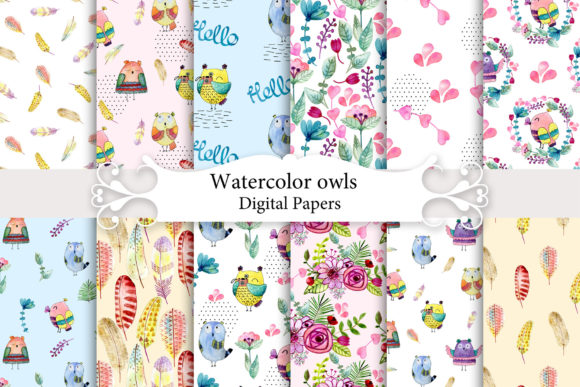
Seamless Patterns with Owls
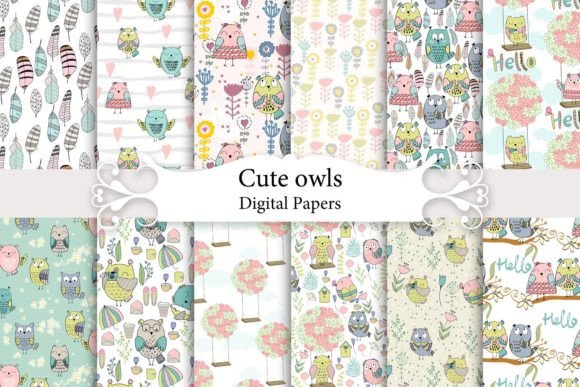
Seamless Patterns with Owls is a curated digital design kit built for creators who value consistency, scalability, and charm in their visual assets. At its core, it’s a set of 12 high-resolution JPEG files—each 4800×4800 pixels (16×16 inches at 300 DPI)—designed to tile without visible seams. That means you can repeat any pattern edge-to-edge across any surface or canvas, whether you’re designing a full-page scrapbook layout, printing fabric for baby clothes, or building a cohesive brand background for a blog or product line. The owls featured are intentionally CUTE OWLS: friendly, expressive, and stylized—not hyper-realistic—making them versatile across age groups and applications without feeling overly juvenile or clinical.
Where Seamless Patterns with Owls Fits Into Your Creative Workflow
This kit doesn’t exist in isolation. It integrates most effectively when treated as a foundational layer—not an afterthought. Think of it like selecting paper stock before sketching a logo or choosing a typeface before writing a campaign brief. Because the patterns are seamless and resolution-robust, they support both early-stage ideation and final-stage production. For example, a small business owner launching a line of organic cotton onesies might use one of the owl patterns as a mockup background during initial pitch decks—then scale that same file directly into print-ready fabric specifications. No reworking, no interpolation, no loss of fidelity.
Similarly, educators developing printable classroom resources—like themed reading logs or reward charts—can embed a subtle owl pattern as a watermark or border element. Since all 12 designs are delivered at identical dimensions and DPI, swapping one for another maintains layout integrity across dozens of documents. That uniformity reduces decision fatigue and accelerates iteration cycles.
Practical Integration Across Tools and Platforms
You don’t need specialized software to begin using Seamless Patterns with Owls—but knowing how it behaves in common environments helps avoid bottlenecks. In Adobe Photoshop or Affinity Photo, open any JPEG, then use the “Offset” filter (Filter > Other > Offset) with horizontal and vertical values set to half the image width (2400 px) to quickly check seam alignment. If no lines or breaks appear at the center, the tiling is truly seamless—a quality confirmed across all 12 files in this kit.
In Canva, upload a pattern as a background image, then duplicate and nudge the second instance precisely 4800 px right or down. With snapping enabled, alignment is instantaneous. For Pro users, saving a pattern as a Brand Asset ensures one-click reuse across templates—ideal for maintaining visual continuity in social media posts, email headers, or digital course materials.
For crafters using Cricut Design Space or Silhouette Studio, import the JPEG at full size, then use the “Tile” function under Fill Options. Because the resolution is native to print standards, even large-format projects—like 24×36″ nursery posters—retain crisp detail when scaled up from the original 4800×4800 px base.
Use Cases That Benefit From Consistency and Scalability
Scrapbooking & Mixed Media: Instead of layering multiple low-res elements to fill space, apply a single owl pattern as a base layer. Its seamless nature lets you extend coverage across multi-page spreads without repeating motifs awkwardly. Pair with kraft paper textures or handwritten fonts to ground the cuteness in warmth and tactility.
Apparel & Textile Design: When sourcing fabric for boutique baby clothing lines, suppliers often require repeat swatches at specific dimensions. These files meet industry-standard repeat requirements out of the box—no additional editing needed. You can also isolate individual owls using selection tools and repurpose them as standalone appliqué motifs or embroidery guides.
Digital Art & Illustration: Artists working in Procreate or Clip Studio Paint can import a pattern as a reference layer, then trace over it with custom brushes to create hybrid illustrations—say, a hand-drawn owl perched on a seamless branch motif. The underlying structure keeps rhythm and spacing consistent across panels or series.
Paper Goods & Stationery: Wedding invitation designers, greeting card publishers, and planner creators rely on predictable repeat behavior to ensure bleed areas align correctly across folded cards or spiral-bound layouts. With these files, a 16×16″ canvas gives ample room for safe margins, trim marks, and registration points—all while preserving the integrity of each owl’s expression and posture.
Preparation, Organization, and Long-Term Usability
Before diving into a project, spend five minutes organizing your files. Rename each JPEG meaningfully—e.g., owls-forest-mint_seamless.jpg or owls-stars-gold_seamless.jpg—so you can identify tone and palette at a glance. Store them in a dedicated folder labeled “Patterns/Seamless_Owls”, nested within your broader asset library. This simple step prevents version confusion later, especially if you license additional kits or collaborate with others.
All 12 images are color-managed and sRGB-encoded, ensuring accurate previewing across devices—from iPad screens to desktop monitors calibrated for print. If you work with Pantone references or CMYK output, soft-proof each pattern in your layout software before sending to press. Minor shifts may occur due to ink absorption or substrate texture, but the high bit-depth and clean edges minimize surprises.
For long-term use, avoid resaving JPEGs repeatedly. Each compression cycle degrades quality. Instead, keep originals untouched and export derivatives (PNG for web, TIFF for archival print) only as needed. Consider converting one favorite pattern into a vector tile via Illustrator’s Pattern Options—if you anticipate frequent resizing beyond 4800 px or need transparency support.
Real-World Efficiency Gains
One freelance surface pattern designer reported cutting client revision time by 40% after switching to pre-tested seamless assets like Seamless Patterns with Owls. Why? Because stakeholders focused on composition and color rather than questioning tile alignment or pixelation at the edges. That shift freed up mental bandwidth for higher-level feedback—like emotional resonance or cultural appropriateness of the owl expressions.
Another example: A homeschooling parent building printable activity packs used three different owl patterns—one for math worksheets, one for literacy trackers, and one for reward charts. Because all shared the same scale and grid logic, children recognized the visual system instantly. The consistency became part of the learning scaffolding—not just decoration.
These aren’t edge cases. They reflect how reliability in foundational assets compounds across tasks, roles, and timelines. Seamless Patterns with Owls works best not as a one-off download, but as a quietly dependable component in your repeatable systems—whether you’re batch-producing Etsy listings, prepping a conference presentation, or prototyping packaging for a new product launch.
If you’re evaluating whether this kit fits your current needs, ask yourself: Do I frequently resize, repeat, or repurpose background elements? Do I work across both digital and physical outputs? Do I value time saved on technical troubleshooting over novelty alone? If two or more answers are yes, Seamless Patterns with Owls delivers measurable workflow leverage—not just aesthetic appeal.
Please send a message if you have any questions. Thank you.