Seamless Patterns with Leaves and Skulls
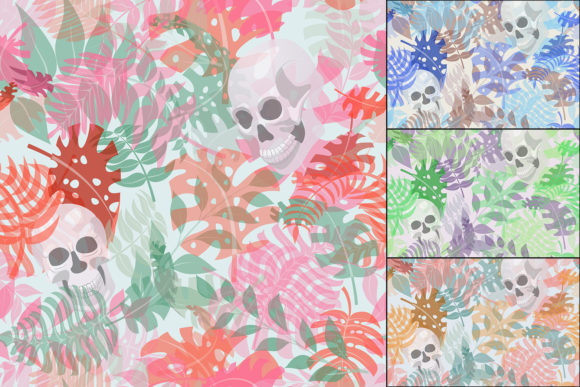
Imagine layering bold, symbolic contrast—lush tropical growth meeting quiet human mortality—not as a clash, but as harmony. That’s the grounded power of Seamless Patterns with Leaves and Skulls: a thoughtfully crafted design resource blending exotic jungle flora (palm leaves, tropical flowers) with stylized human skulls, inspired by the visual language of Día de los Muertos. It’s not just aesthetic fusion; it’s a functional toolkit built for real creative work.
What Makes These Patterns Work—Beyond the Theme
These aren’t decorative motifs slapped onto a background. Each pattern is mathematically seamless—edges align perfectly when tiled—so they scale cleanly across any surface without visible breaks or awkward repeats. The set includes four AI files (Adobe Illustrator CC), four EPS versions (compatible with older vector software), four high-res JPGs (4167×4167 px), and ten additional EPS files offering expanded color variations and layout options. That means you can open, recolor, resize, or isolate elements without quality loss—and adapt them fast.
The balance between organic and symbolic is intentional. The skulls are stylized—not grotesque—carrying cultural resonance without overwhelming the composition. The leaves and flowers feel alive: asymmetrical, textured, layered with subtle variation in size and orientation. This avoids the flatness common in generic pattern libraries. You’re getting rhythm, depth, and narrative cohesion—not just repetition.
Creative Uses That Go Beyond Wallpaper
Designers often reach for patterns to add texture or theme—but this set invites deeper integration. A freelance illustrator might use the vector skull outlines as base layers for hand-drawn sugar skull illustrations, then overlay watercolor washes on top. A small-batch apparel brand could extract single palm fronds or floral clusters from the AI files, reposition them into custom garment prints, and keep consistent spacing and scale across t-shirts, tote bags, and bandanas.
Bloggers and educators covering Latin American traditions can embed the JPGs directly into posts or presentations—no licensing guesswork. Because the resolution is 4167×4167 pixels, they hold up crisply even in full-width hero sections or printed handouts. Need a subtle background for a newsletter header? Tile one of the lighter-color variants at 15% opacity. Building a mood board for a product launch? Drop the EPS files into Figma or Adobe XD and adjust hue/saturation non-destructively to match your brand palette.
For Marketers & Small Business Owners
If you’re launching a limited-edition candle line themed around life cycles and renewal, these patterns let you unify packaging, social assets, and email banners with visual consistency—without hiring an illustrator for every touchpoint. Use the editable vectors to place a skull-and-leaf motif along the spine of a label, then repeat a simplified version as a border on Instagram Stories. Keep tone respectful and rooted: avoid reducing Día de los Muertos symbolism to “edgy decor.” Instead, lean into authenticity—pair the patterns with thoughtful copy about remembrance, celebration, and cultural continuity.
For Educators & Content Creators
Teachers designing classroom materials on Mexican art, folklore, or botanical illustration can isolate individual elements (a single marigold, a stylized skull profile) and use them as labeling exercises, pattern-analysis activities, or digital collage prompts. The high-resolution JPGs print cleanly at poster size; the vector files allow students to experiment with symmetry, rotation, and tiling logic in beginner-friendly design tools. No need to simplify the subject matter—just present it with clarity and context.
How to Adapt Without Losing Intention
Flexibility doesn’t mean losing meaning. Start by asking: What’s the core idea I want to communicate? Is it celebration? Contrast? Resilience? Growth amid change? Let that guide your edits. If you lighten the colors significantly, test whether the skull remains legible and culturally resonant—or if it starts reading as abstract geometry instead of meaningful symbol. If you invert the palette (dark background, light motifs), check contrast ratios for accessibility in digital use.
Consistency across platforms comes from restraint—not repetition. Pick one dominant pattern variant for your primary brand application (e.g., the deep teal and terracotta version for packaging), then use monochrome or line-only versions of the same motif elsewhere (like social media icons or invoice footers). That builds recognition without visual fatigue.
Practical Tips for Getting Started
- Start small: Open one AI file, ungroup layers, and hide everything except the leaf cluster. Recolor it using Global Swatches—then toggle back the skull layer and adjust its hue to harmonize, not compete.
- Respect scale: On fabric or wallpaper, larger repeats (like the full 4167×4167 JPG) read as bold statements. For web UI backgrounds or notebook covers, scale down and reduce opacity to avoid visual noise.
- Test cultural context: If sharing publicly, briefly note inspiration (e.g., “Inspired by Día de los Muertos floral symbolism and reverence for life cycles”)—not as disclaimers, but as invitations to learn more.
- Keep files organized: Rename your edited versions clearly (e.g., “SkullLeaves_Teal_WebBG.ai”) so you can quickly locate the right asset for each project phase.
This set works because it meets creators where they are: with usable files, visual integrity, and room to interpret—not prescribe. You don’t need to be a Día de los Muertos expert to use it well. You just need curiosity, attention to audience, and willingness to let form support meaning—not override it. Whether you’re designing a festival poster, updating a Shopify theme, or illustrating a zine about ecology and memory, Seamless Patterns with Leaves and Skulls gives you structure, symbolism, and scalability—all in one download.